I almost wish it was Electron based. A bunch of things made the usage almost impossible.
- MacOS has handy text navigation shortcuts: alt-arrow to go back a word, alt+shift+arrow to select a word, etc. These don't work, and I'm too used to them to stop using.
- I'm using Colemak keyboard layout (L key inserts letter "i"), but keyboard shortcuts don't respect it. So in my mind I have to press Cmd + U ("u" is mapped to I key) to make text Italic. Again, this broke my usual habbits.
- Common MacOS shortcuts (even Cmd + Q to quit) don't work.
I like the ideas behind this editor, but now I hope someone ports it to HTML + JavaScript, so it works keeping all the OS-provided affordances.
It is just that at some point someone asked me to make distribution so I've created that web site.
Another question was to understand: donation-ware, is it a sustainable solution. Apparently it is not - donation does not even cover sums asked by Apple for allowance to develop software for their platform.
Tangential, but for the pain of alternate keyboard layouts, I've found it easiest to use a keyboard that allows remapping of keys in hardware to alternate layouts (sends the 'wrong' keycode when you press a key). It's a bit of a hack, but it works much better than equivalent software hacks.
System having "both views" -- software view (where "i" might be on key L) and hardware view (of physical key placements) -- is very useful. For example, when using Colemak on Windows, I can play using WASD physical keys, but many games correctly name them WARS.
This feels a bit like the old reddit post about how now one would ever use Dropbox because you can just roll your own FTP server. Good points though on OS tracked features.
This was my first question. I am an avid user of older technology, and I regularly do lots of writing for the web in HTML format. I cannot use any of the new Electron-based programs on my laptop due to their exorbitant resource usage. This program in its current form is perfect. However I would not continue to use it if it were upgraded to a modern JS based framework.
This is the first thing I checked, and was so relieved to see that it wasn't one-more ElectronJS app wasting the resources of my PC for to simplify the life of the programmer
Honestly it seems like this would be one of the few justifications for using electron. You're literally rendering HTML, getting that as accurate as possible is a plus.
I have a question; if I get Sciter can I use (I mean does it expose) your lower-level cross-platform abstraction instead of the DOM and CSS? I don't want to make documents, nor do I think HTML's layout(s) nor CSS are appropriate for applications. But I would very much like a cross-platform scene graph like that exposed by Flash back in the day, which I could build atop the same sort of foundation one would want underneath their CSS/DOM impl.
DOM is tree of lightweight nodes and elements. In Sciter each DOM element may have native controllers, known as behaviors. Examples of those: https://github.com/c-smile/sciter-js-sdk/tree/main/include/b... . So you can create single DOM node - document and attach your native behavior to it. It will receive all events and will do drawing if you want.
Some applications are using mixed model: DOM where it makes sense, and custom native behavior where high performant handling is required.
In fact DOM and ImGraphics have their strong points but in different situations. Sciter allows to have best of two worlds by combining them.
In any case when you say "I don't need DOM", it means that you will implement it on your side. Been there, seen that many times.
It's not that I don't want any DOM, it's that I specifically don't want "the" DOM as seen in web browsers. What I want is a scene graph without layout or CSS, but with events and transform nodes and the like. You can get close to this in web DOM just by making everything absolute and just not using CSS, but without a way to measure text before drawing it, you can't do your own layout properly.
It looks like Sciter might be what I need to build on top of though, I will look into it further.
Can you give me some info on "new Sciter - the one that uses JavaScript"
Last time I played with Sciter it was based on a proprietary JS engine that wasn't fully exchangeable with common JS. Is that not the case any more, and Sciter will now understand ECMA standard JS?
QuickJS complies to ES2020 specification. And Sciter exposes most popular and modern DOM API so MithrilJS, PReactJS and other libraries work as they are.
Sciter implements far not whole set of DOM API - just essential ones. In fact DOM API and so browsers are full of garbage - old historical layers of stuff from initial Netscape JS API, IE6, etc. For example there is no XMLHttpRequest but there is Fetch API : https://developer.mozilla.org/en-US/docs/Web/API/Fetch_API
Sciter goal is not to support browser API as it is - with all its bells and whistles, after all desktop use cases require features that are not available in browsers anyway.
But all non-UI libraries from NPM collection should work as they are in Sciter. Most of pure Vanilla JS UI components should also work as they are, for example LeafletJS (maps) https://sciter.com/sciter-js-runs-leafletjs-as-it-is/
I understand that this project is to showcase Sciter SDK (https://sciter.com) a nice project.
Here I'm showing something I did some time ago https://meimporta.eu/htmleditor/ it's a crude WYSIWYG html editor for people that already knows HTML/CSS and uses basically the browser contenteditable capabilities. It was inpired by Webflow (https://webflow.com/) but very simple and basic, it has 4 main sections: editor shortcuts, wysiwyg editor, html editor, tree view. Some things are easy done in the wysiwyg editor but sometimes the raw html editor is better, we can edit in both of then and get instant result.
Don't bother comment on the UI/UX it's an personal naive tool straight to the point I needed. Anyway any feedback to improve is welcome.
Yes you should pull it from the link, it's almost self contained and you'll need to edit the source to point to you html source or copy and paste it on the editor.
This is a very pretty application, and very fast. It reminds me of older text editors.
However right now it's very buggy. I used it for 5min and encountered bug after bug. Even ⌘Q types in "q" and beeps instead of quitting the app.
Also, I suggest you use markdown shortcuts (e.g. typing # will create a header, *text* will make your text italic, etc.) I'm used to them in most text editors and they make editing super easy and fast. Of course keep the content WYSIWYG, just markdown shortcuts, and you can add an option to turn them off in case someone doesn't like them.
Overall though I hope you keep working on this and iron out the bugs, because otherwise it's a great app.
1. the markdown source button does nothing. I have no idea what it's supposed to do, but I didn't see any effect whatsoever.
2. If you type * or h1 etc. then space, it will automatically convert to list/heading etc. However, this doesn't work in the first line.
3. In the `pre` block, when you press enter the cursor doesn't move to the next line. But if you type something then, you will find it will start on the next line. Probably some CRLF shenanigans going on but it's definitely not what the user would expect for a WYSIWYG editor.
You might also like Etherpad :) https://etherpad.org although Etherpad doesn't natively support tables and some other features this has they are optionally installed as plugins.
What's exactly the use case, here? When would I want to use this and not a markdown editor, or word/gdocs/lowriter/…'s HTML export? Or something like TinyMCE?
Static site generators, maybe? Assuming it can be taught to handle their non-HTML metadata…?
The notepad allows you to edit the document in markdown form.
That editor is essentially for "Internet Content Writers" - people who create textual content. It is definitely not for creating websites - "HTML-NOTEPAD is not a “web page editor”. Don’t even expect to create “cool web pages” with it" from the front page.
I by myself use it with WordPress and GitHub - write content and then by using either html source or markdown source publish it on those platforms.
> I by myself use it with WordPress and GitHub - write content and then by using either html source or markdown source publish it on those platforms.
I'm not too familiar with Github pages, but in Wordpress's case it sounds incredibly wasteful as you lose all the benefits of Wordpress's modular editor. Why even bother with Wordpress at that point and not use a more lightweight CMS?
I am not using modular editor in WordPress - found it too limited and not keyboard friendly. But that's just my own experience - for someone it could be OK.
This is an interesting app, but the English on the landing page needs some editing by a native speaker/writer. It doesn't look like English is the first language of whoever wrote that text.
Looks really cool. I tried to add some CSS (inline/local/from CDN) but it didn't work. If it worked I would use it instead Notion to make some nice looking notes. Some feedback - would be nice to have shortcut to source. Portable version have unnecessary folders (sciter\sciter\sdk\bin\32\files). When I have one note (tilted 'new') opened the title is written vertically as:
N
E
W
If I change title or create another note then it's written horizontally.
The CSS still works in the browser so it isn't cleared just ignored. This is enough for me, I could use something like Parcel or Vite to observe folder with notes to reload changes in browser. This way (HTML Notepad + live reload) I can combine WYSWYIG + inline CSS to create good looking single page notes and replace Notion in some cases (it's slow and I don't own files as they are in cloud).
I've had a lot of fun in the Sciter SDK. It's one of the few desktop UIs with hooks for golang that just works. I remember the learning curve to be up there though.
The fact that you can edit the elements and they persist is really cool. I wrote a markdown editor for my website that renders HTML and Vue components at request time, but you have no control over component properties. Impressive stuff.
Reading arbitrary css and html into something editable sounds like hell. On the other hand, translating an arbitrary layout to html doesn't sound particularly hard.
Really smooth experience - especially considering the purpose of the application.
From the "Better html-notepad" section:
> Application Development is tought. Especially design of simple and usable applications.
> I've created this HTML-NOTEPAD application for myself as I am writing a lot on Internet these days. And I am giving it for free with the hope it will be useful for others.
Second: I may follow up directly with the author, but are there any convenient workarounds for num-pad shortcuts? I'm on Windows but really don't prefer using my (detached) numpad for common shortcuts.
Not going to complain about lack of shortcut customization considering the first part of this comment. Great work - cheers.
It feels a lot like the built-in WordPad that comes with Windows, or TextEdit that comes with Macs, in that they both support similar basic formatting but are also both historically built on RTF rather than HTML.
I'll admit I don't really understand the intended audience for this, however. Since it's not for webpages, it seems to be aiming at more basic text editing.
But hasn't Markdown pretty much become the de facto standard for that? For text documents, why would you ever want to write and edit in HTML directly, rather than easier-to-use Markdown that can be converted to HTML on the fly? (Especially with WYSIWYG Markdown editors existing.)
One could call documentation a very specific domain for writing and perhaps Markdown is not ideal for that?
Personally I use it to write letters, notes, blog articles, and such. When I need to write something more complex I might or might not use markdown while embedding some other language. Eg. my thesis is written in Markdown but uses Latex.
Depending on the context you can indeed use the concrete code you wrote as Markdown. You could insist on embedding the the <section> pieces into a Markdown document and use a markdown to HTML preprocessor.
But you are the judge on whether this is a good idea.
HTML supports wide range of applications. Even basic HTML provided more semantic value.
You can use it as for articles as for structured documentation. As it supports hierarchical structure + classes.
And pure markdown is not structural and not extendable by design - essentially just a flat list of paragraphs.
Yes, you may have some containers there like <blockquote> and <ol> but that's pretty much it. Why there are no sections or any other form of grouping content?
Markdown has exactly the same problem as MS Word / Richtext - they are very good in WYSIWYG but are terrible in semantic.
Markdown.Next shall be in the golden middle between HTML and current MD - with modularity built-in by design.
It does support editing as in WYSIWIG as in Markdown form.
Actually markdown is also form of WYSIWYG. But WYSIWYG on steroids I would say. Markdown format was explicitly designed to emulate WYSIWYG but in plaintext.
+1 It looks like the result of a collaboration between a good designer and a good programmer. The app is intuitive and the homepage is well designed too.
I did it by myself. It is not that I am good designer even that I have artistic education (oil painting) but my primary is MS in Applied Physics/Maths (the combination specific for GUI/UX developers I think).
Every graphic on the intro screen says "ctrl+whatever" instead of "cmd+whatever".
The standard text editing shortcuts don't work. You can't hold option to jump word by word, you can't use ctrl+e or ctrl+a to jump to the end or start of a line, etc.
This alone makes me not want to use it. Every other program I've run supports these things.
This program has a very responsive, minimal feel that I am really enjoying. One minor problem that I've found is that (on Linux) you cannot copy text out of HTML notepad's default view.
There is no standard way of representing HTML in clipboard on Linux/GTK. Unfortunately.
Even plain text has multiple, conflicting formats.
Sciter definitely puts text in GTK clipboard. And it works as far as I can tell, proof: https://sciter.com/linuxnotepad/ on my Linux Mint. So your problem needs some details.
I wish we had a WYSIWYG focused on extremely explicit whitelist of nodes and attributes permitted, and in what configuration (you can put X in Y, but not Y in X).
CKEditor allows that level of customization. I think TinyMCE may as well. You also can massage your data as it comes in and out of the editor. I have a React wrapper for our editor that walks an HTML tree, and if nodes match criteria I've coded, I act on them in various ways before loading it all into the editor.
The point being that there is no lack of options for building out such features. I'm not sure you'll ever get an editor to do it out-of-the-box, though, because everyone's needs are going to be different.
One use case would be to integrate it blog sites for adding blog content (with markdown). But I don't know whether it supports this integration or not.
Technically possible but practically having source of the document available (html or markdown) is enough for most cases for copy-pasting to destination. Otherwise passwords to web sites / blogs need to be stored outside of browser, all that...
HTML/CSS renderer: takes HTML+CSS as input and produces rendering.
WYSIWYG editor: takes rendering (what you see) and tries to produce HTML+CSS (what you get).
With pure HTML (v 3.2, before styles) WYSIWYG was possible as, for example, to change color of the text you had only one option: <FONT color="red">. With CSS you can apply color the span in many ways: you can use any element for span and apply CSS in various ways.
Rendering, the direct task, is N(rules) -> 1(rendering).
And editing, the opposite task, is 1 -> N. Mathematically speaking this task is unsolvable - has no determined solution.


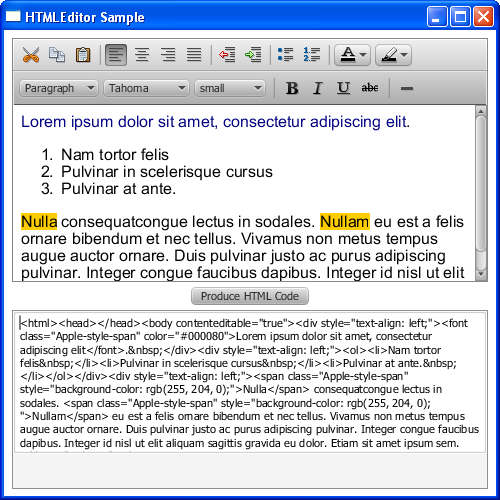
html-notepad is Sciter based application so its distribution is only 5 MB.
It's sources are here https://github.com/c-smile/sciter-sdk/tree/master/notepad . This still uses old Sciter.TIS and I am porting it to new Sciter - the one that uses JavaScript.
I am an author of the editor (and Sciter).